Design Principles
Shared Tenant
- Module Installation is in the Parent Tenant (ex. common)
- Objects can be inherited to Children
- User can have for example only access to Child Tenant and with that have only access to the inherited Objects
- Creating Service Instances from an inherited Service will create Service Instances in the corresponding Child Tenant
Isolated Tenant
- Objects like Services/Service Instances/Devices/Reports/… are isolated to a Tenant
- The Module Installation is per Tenant and for example a ACI Module can be installed many times (once per Tenant). Devices must be added per-tenant, so no shared objects are supported for module installation.
- Currently per Default the Netcloud Modules are shipped in common Tenant but they can be duplicated in the Admin GUI
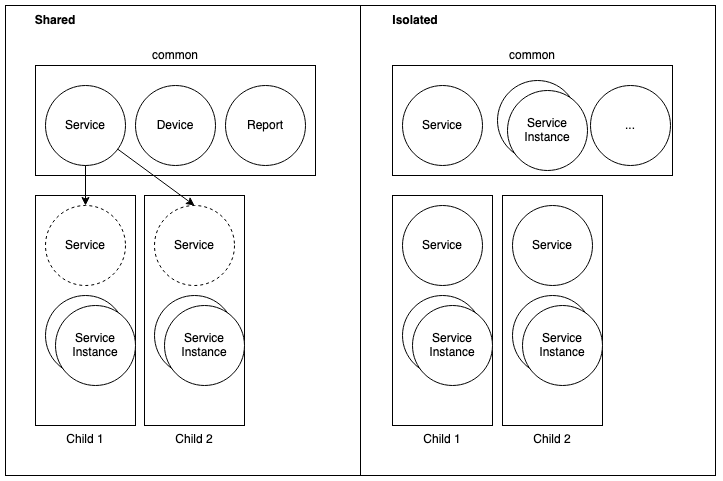
NCAE provides three levels to control visibility of data:
Tenants (AWX: Organizations)
Used to control visibility of whole sections (Modules, Services, Service Instances, One Time Reports, …) and can be tied to the module installation. Tenants are essentially a “global filter” for data, but do not affect the possible actions for users. Tenants may also be used to group data according to your organizational structure. Tenants support inheritance, so a “child tenant” does display Services, Device, One Time Reports from its “parent tenant(s)”.
Groups (AWX: Roles)
A collection of permissions, with a descriptive name (e.g. “deployer”). Groups are a simple helper to assign the same permissions to multiple users. The Default Groups are:
- Superuser (Has full rights to all Tenants and can do everything including the access to the admin GUI. This group is intended for automation/infrastructure admin’s, like the one who is responsible for NCAE)
- Admin (Has full rights to the selected Tenants and can do everything. This group is intended for infrastructure admin’s)
- Operator (An Operator have the Reader Permissions and can do Changes to Service Instances. He can’t change stuff from the NCAE self, like (Services, Credentials, etc.)
- Reader (ReadOnly)
Permissions (AWX: Capabilities)
The most granular level of control, mostly based on django permissions (view, read, change, delete per “Section” such as Service, Service Instance…). Recommendation: always use groups to grant users permissions.
Shared objects
All objects (Services, Devices, Reports, …) can be explicitly shared between Tenants. This may be useful when some users may only see specific elements - a Tenant can be created, and objects shared with this tenant. Shared objects can be managed in the django admin (/admin/rbac/sharedobject/).
Recommendations:
- Periodically assert permissions and disable users - this does not happen automatically.
- The NCAE core team is happy to help with the initial setup. Once this is in place, not many changes should be necessary.
- Check the visible elements by using the “impersonate” feature, so that you can browse the NCAE as a specific user.