LDAP Group Mapping
LDAP group mapping keeps an LDAP user’s NCAE groups and tenants in sync when the user logs in. Each map matches the full distinguished name (DN) of an LDAP group and assigns one or more NCAE groups and tenants.
Configure LDAP
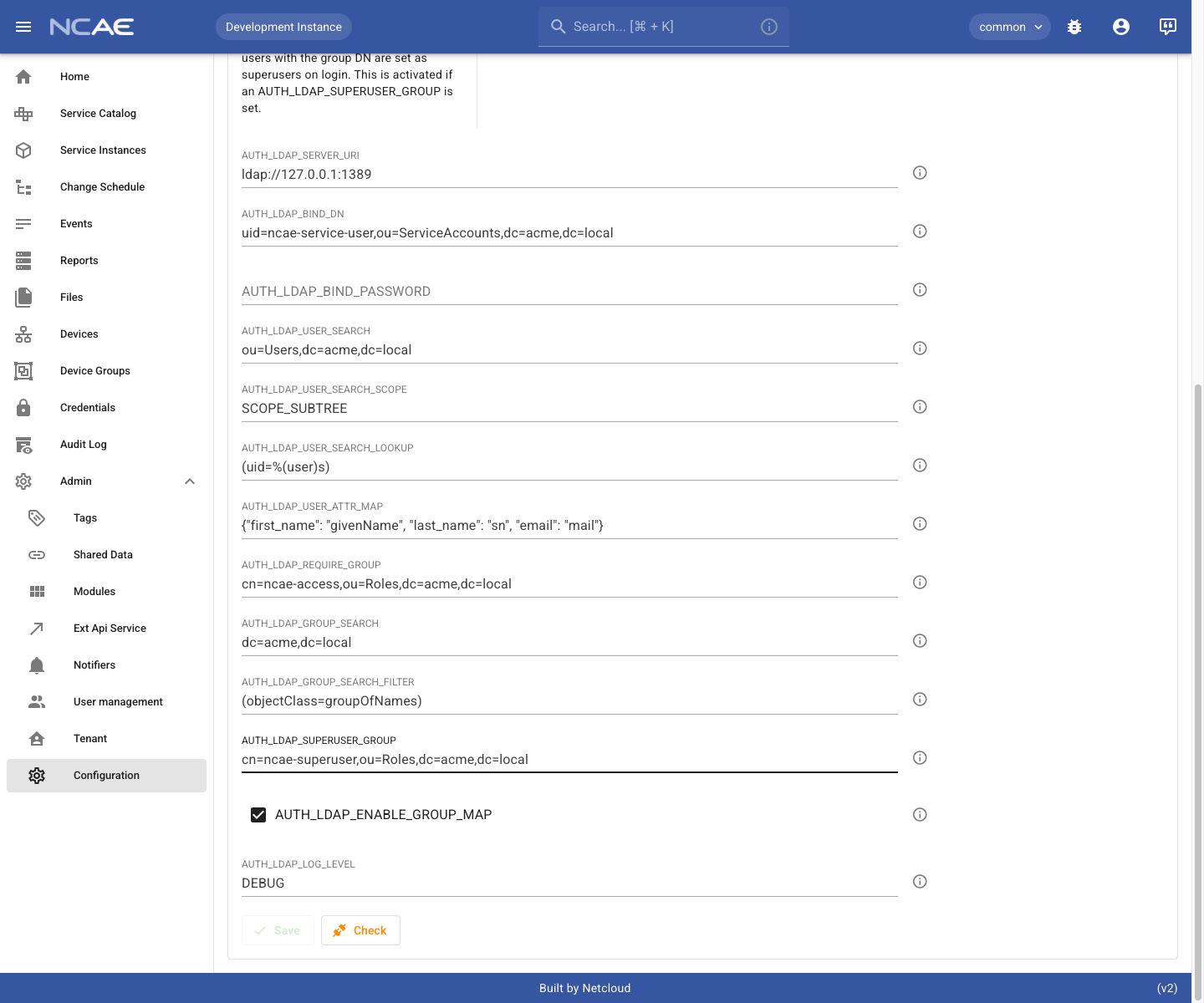
LDAP authentication must already be configured and working. Configure these values under Admin > Configuration:
| Setting | Purpose |
|---|---|
AUTH_LDAP_SERVER_URI | URI of the LDAP server. |
AUTH_LDAP_BIND_DN | DN used to search LDAP. Required when anonymous searches are not allowed. |
AUTH_LDAP_BIND_PASSWORD | Password for the bind DN. Required when anonymous searches are not allowed. |
AUTH_LDAP_USER_SEARCH | Base DN used to find users. |
AUTH_LDAP_USER_SEARCH_SCOPE | LDAP search scope, usually SCOPE_SUBTREE. |
AUTH_LDAP_USER_SEARCH_LOOKUP | User lookup filter, for example (uid=%(user)s). |
The group-mapping feature itself requires both of these settings:
| Setting | Required value |
|---|---|
AUTH_LDAP_GROUP_SEARCH | Base DN from which NCAE searches group entries. |
AUTH_LDAP_GROUP_SEARCH_FILTER | LDAP filter selecting the directory’s group object class. Defaults to (objectClass=groupOfNames); use (objectClass=group) for Active Directory. |
AUTH_LDAP_ENABLE_GROUP_MAP | Enabled. |
NCAE reads group membership from the LDAP member attribute. Both groupOfNames and Active Directory group
entries use this attribute. Changing only the filter is not sufficient for schemas that use another membership
attribute, such as groupOfUniqueNames (uniqueMember) or posixGroup (memberUid).
AUTH_LDAP_REQUIRE_GROUP and AUTH_LDAP_SUPERUSER_GROUP are optional. They restrict login to members of a specific
group and grant the superuser flag to members of a specific group, respectively; neither setting creates group maps.
Example: map an LDAP team to the Reader group
This example uses the fake LDAP directory included in the NCAE development environment. It maps members of the LDAP
team-network group to the NCAE Reader group and the common tenant.
1. Set up the LDAP group
The LDAP group must use the groupOfNames object class. Its member attributes contain the full DNs of its users.
For this example, assume an LDAP directory as follows:
dn: cn=team-network,ou=Groups,dc=acme,dc=local
objectClass: groupOfNames
cn: team-network
description: All members of the Network department
member: uid=nina.netter,ou=Network,ou=Users,dc=acme,dc=local
member: uid=neal.router,ou=Network,ou=Users,dc=acme,dc=local
2. Configure the group search
Set AUTH_LDAP_GROUP_SEARCH to a base DN that contains the LDAP group. The example uses dc=acme,dc=local, which
includes cn=team-network,ou=Groups,dc=acme,dc=local. A narrower value such as
ou=Groups,dc=acme,dc=local also works when all relevant groups are stored below that organizational unit.
Set AUTH_LDAP_GROUP_SEARCH_FILTER to (objectClass=groupOfNames) for this example. Active Directory uses
(objectClass=group) instead. The filter must be enclosed in parentheses.
Enable AUTH_LDAP_ENABLE_GROUP_MAP, then save the configuration. The screenshot also sets
AUTH_LDAP_LOG_LEVEL to DEBUG so the LDAP search and returned group DNs are visible while testing the setup.
3. Create the NCAE group map
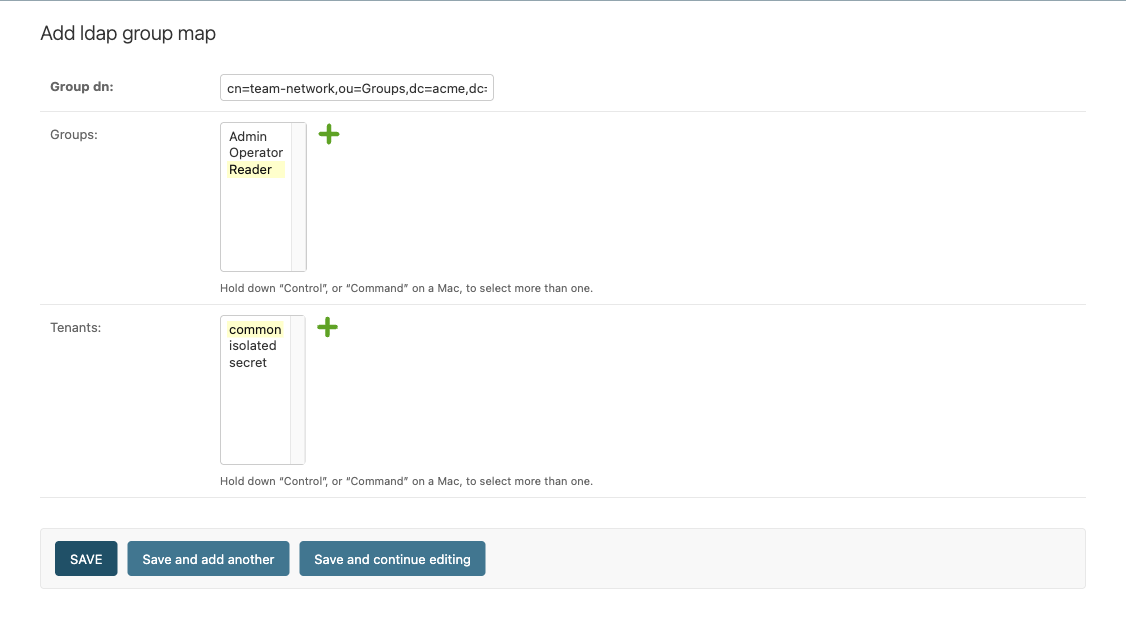
Open the Django admin’s Authentication > Ldap group maps section, or follow the managed in the django admin link on the configuration page. Create a map with these values:
- Group DN:
cn=team-network,ou=Groups,dc=acme,dc=local - Groups:
Reader - Tenants:
common
The group DN must be the full LDAP DN. Matching is case-insensitive.
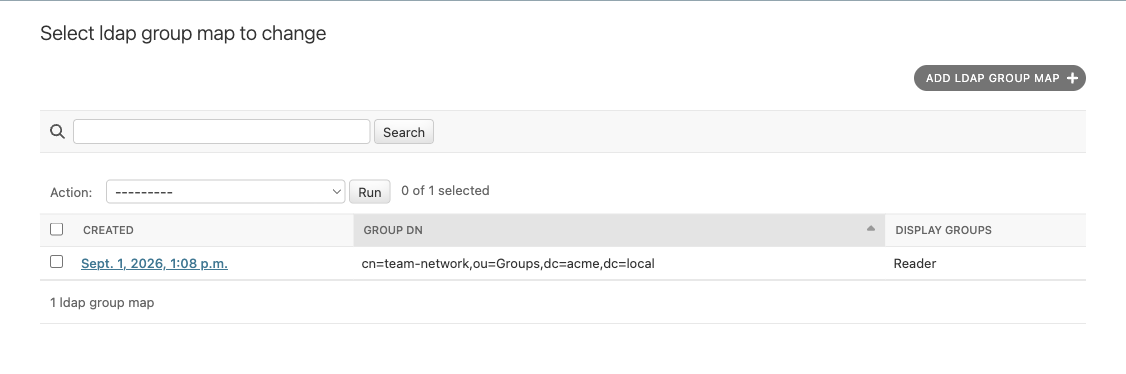
After saving, the map appears in the LDAP group-map list:
4. Verify the result
Log in an verify the roles in the django admin (Authentication and Authorization -> Users).
In this example, when logging in as neal.router, LDAP provides both team-network and ncae-access. The team-network map
assigns the NCAE Reader group and the common tenant. ncae-access only controls whether login is allowed when it
is configured as AUTH_LDAP_REQUIRE_GROUP; it does not assign an NCAE group unless it has its own group map.
Mapping behavior
The mapping is applied after every successful LDAP login. NCAE replaces the user’s existing group and tenant memberships with all groups and tenants produced by the matching maps. A user whose returned LDAP groups match no map therefore receives no NCAE groups or tenants.
Troubleshoot group searches
Set AUTH_LDAP_LOG_LEVEL to DEBUG to log the configured group-search query and the group DNs returned for a user.
This also enables verbose django-auth-ldap logging, so use it temporarily and treat the logs as potentially
sensitive.