Reports - Store and display infrastructure data
Basics
Reports are flexible in regard to data collection and visual representation. This flexibility means that the basic setup requires some work. These guidelines should help developers to set the right flags.
Reports are designed with two use cases in mind:
- display/export of data
- lookup table for dynamic values when filling in data on Services (e.g. a dropdown with free IPs only)
Data collection
The flag is_async (default: False) defines the data collection.
If is_async is falsy, the external API is called synchronously when a user requests a report. It is expected that these calls can run up to 60 seconds. In order to get a better user experience it is possible to cache a report for a predefined amount of seconds.
If the flag is_async is truthy, it is expected that a ChangeSchedule is added manually, so that data is fetched
regularly. This is not done automatically, as the interval and ServiceInstance of the ChangeSchedule may vary.
As a ChangeSchedule can only relate to a ServiceInstance, so a Service must be created and its Phase should call a
module that writes data back to NCAE core. This call back to the NCAE core can either update the last_response field
of the Report or write data to an influx database (see report representation).
In case of error during the asynchronous data collection, the logs are available on the service instance detail page or the “Events” list.
Reports
The HTTP call sequences:
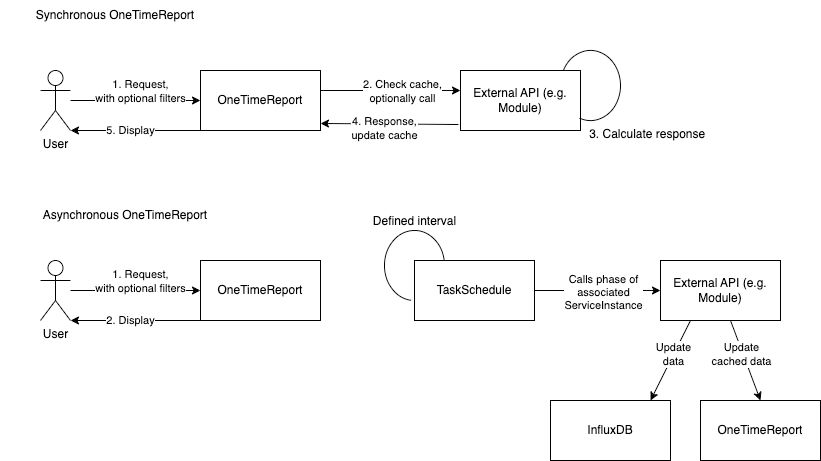
Report Sequence during Report Collection
Each Report must be associated with a Device and have a report description like following example:
name: 'Detail-Leaf'                     # Report name
description: 'Gets a Leaf Port Report'  # Report description
url:                                    # URL of the collector API, needs to be set if use_collector is false
uri: '/api/v1/collect/detail-leaf'      # URI of the collector API
use_collector: true                     # Use device specific collector (same as for DB based reports)
send_credentials: true                  # Includes Device credentials in the post call to the collector
cache_time: 300                         # Amount of seconds the Report response will be cached
device_id: 2                            # Association with the Device
allow_parallel_requests: false          # Allow concurrent requests for this Report. Useful to prevent rate limit errors. Defaults to true.
template:                               # Optional template for GUI form rendering, same as on the automation part
  values:
    - name: leaf_id
      type: dynamic_dropdown
      label: Leaf Name
      dropdown:
        endpoint: "api/dashboard/v1/device/{{ DEVICE_ID }}/onetimereport/Base-Leaves"
        results: "$.data.*"
        input-form-text: ["$.NAME"]
        input-form-value: "$.NODE"
        url_type: "backend"
      required: true
Example POST Call from Backend To Collector API
{
  "ip": "1.1.1.1",
  "username": "string",
  "password": "string",
  "leaf_id": 111
}
Example Response from Collector API To the Backend
{
  "fields": [
    "Port",
    "Description",
    "Usage",
    "Status"
  ],
  "field_data": [
    {
      "Port": "eth1/1",
      "Description": "test",
      "Usage": "discovery",
      "Status": "up"
    },
    {
      "Port": "eth1/2",
      "Description": "test",
      "Usage": "discovery",
      "Status": "up"
    },
    {
      "Port": "eth1/3",
      "Description": "",
      "Usage": "discovery",
      "Status": "up"
    },
    {
      "Port": "eth1/4",
      "Description": "",
      "Usage": "discovery",
      "Status": "down"
    },
    {
      "Port": "eth1/5",
      "Description": "test-vpc",
      "Usage": "discovery",
      "Status": "down"
    },
    {
      "Port": "eth1/6",
      "Description": "",
      "Usage": "discovery",
      "Status": "down"
    }
  ]
}
Content Structure
The structure of the response body impacts the way the reports are displayed in NCAE core. Following keys are supported:
- fields (list, required): contains the information about the field headers
- field_data (list, required): a list of objects to display. The attributes must match the “fields”
- metadata (string, optional): optional metadata, which is shown at the top of the table. E.g. timestamp of the last update.
Special cases:
- field_data with tooltips:
{
  "Port": "eth1/6",
  "Description": {"value": "initial value", "extension": "this content is shown in a tooltip" },
  "Usage": "discovery",
  "Status": "down"
}- field_data with links:
Note that the full field_data is passed into the href as template literal ( ), so constructs such as {“href”: “onetimereports/downlinks/?some-filter-field${item.fieldName}”, “value”: “goto report”}, are valid. The full row is passed as context, named item. All attributes of the row can therefore be used as query param for other OneTimeTemplates. Note that the reports are resolved by their slug, not ID. This allows module devs to provide “static” links to their reports.
"field_data": [
    {
      "Port": "eth1/6",
      "Url": {"href": "/onetimereports/<some-slug>/?<filter-field-name>=${item.Usage}", "value": "text" },
      "Usage": "discovery",
      "Status": "down"
    }
]